On August 11, 2026, the Chrome Security, Safe Browsing, and Firebase Cloud Messaging teams published a breakdown of how Chrome now fights abusive notifications. The headline number is striking: Chrome is “reducing notifications on Android by over 7 billion a day in Q1 alone.” That is not a single rate limit. It is a layered enforcement system, and it is running right now.
If you send web push notifications, this is worth understanding, because it changes what a healthy subscriber list looks like. The short version: responsible senders are not the target, and Aimtell already handles most of this for you automatically. In this post we will cover what Google announced, why a stricter Chrome is genuinely good for your results, why your subscriber count may have dropped (and why that saved you money), and the settings worth reviewing in your account today.
What Google Announced
Chrome’s approach is defense in depth. Rather than one rule that bad actors can engineer around, there are several independent layers that each catch a different kind of abuse:
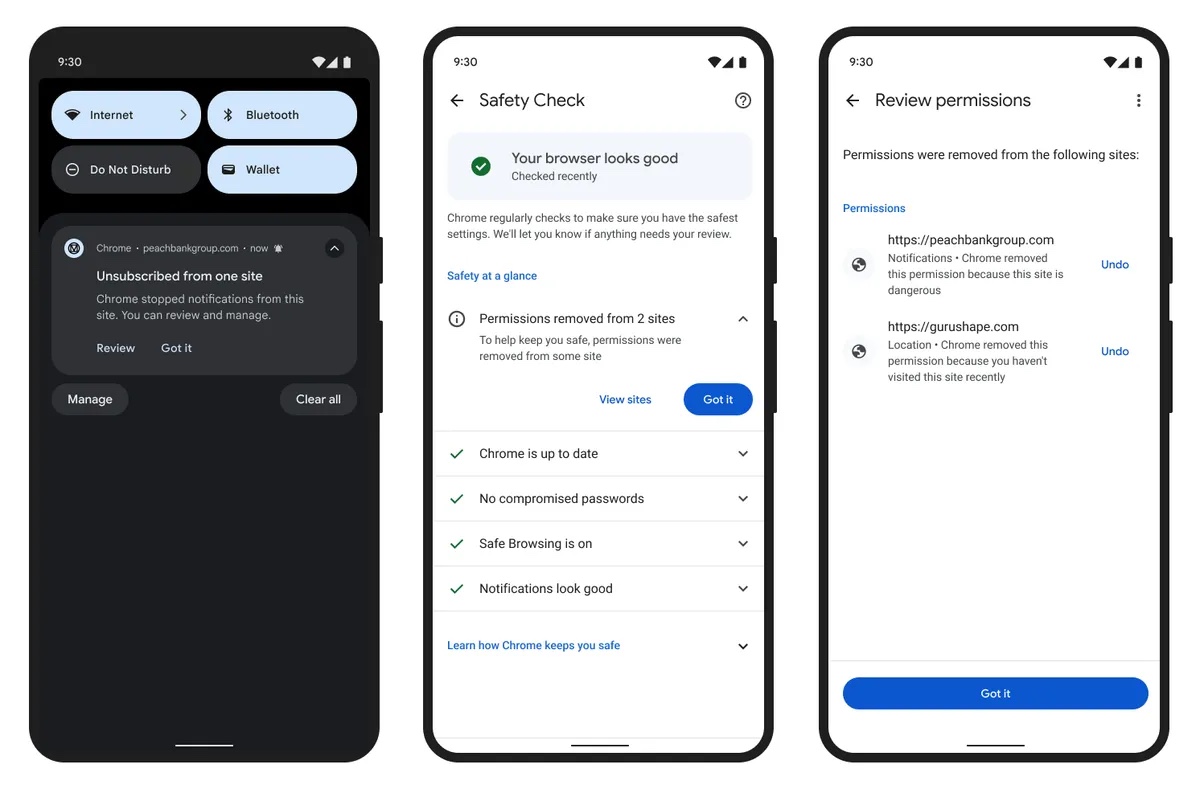
- Automatic permission revocation. Chrome automatically revokes notification permissions for sites the user has not recently engaged with. Permissions are also revoked from sites that repeatedly trigger suspicious notification warnings.
- Abuse network detection. Chrome uses behavioral analysis of service worker activity to identify coordinated networks of sites distributing malicious content, then proactively revokes permissions from persistent bad actors.
- Server-side throttling. Firebase Cloud Messaging rate limits the Push API. Domains identified as disruptive are limited to 1,000 messages per minute and receive HTTP 429 responses beyond that. The limits escalate with repeat offenses.
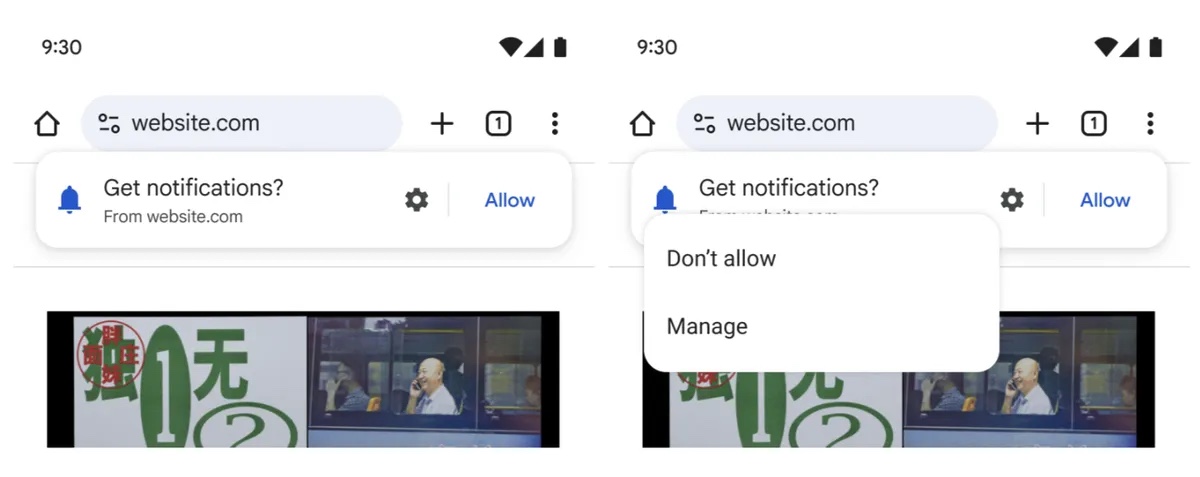
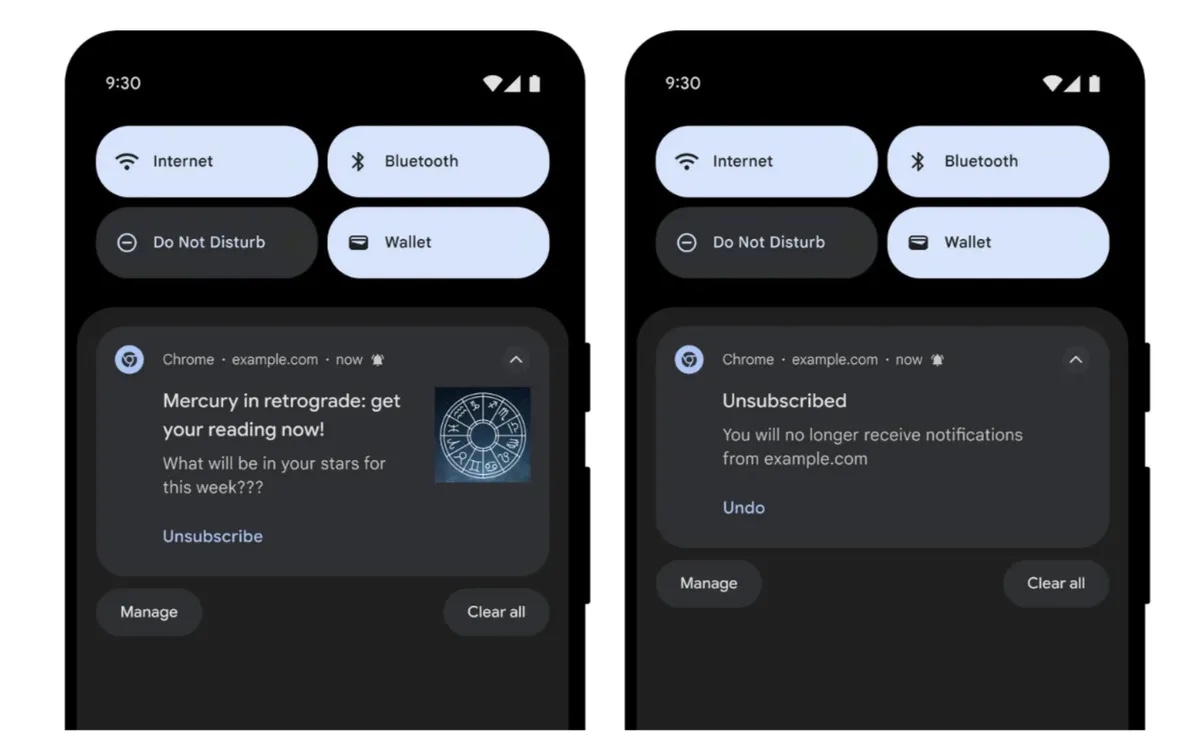
- A streamlined permission model. Chrome on Android reworked the notification permission prompt to reduce prompt fatigue, and added one tap unsubscribe so users can remove a site’s permission without digging through settings.
Note the pattern across all four. Three of them key off engagement and behavior, not volume. Only the throttling layer is about raw send rate, and we covered that one when it was first announced in our post on Chrome’s push notification rate limits. The newer layers care about whether people actually want what you are sending.
Why a Stricter Chrome Is Good News for You
It is easy to read “7 billion fewer notifications per day” as bad news for the channel. It is the opposite.
Push notification performance is a shared-reputation game. Every spammy, misleading, or relentless notification a user receives makes them slightly less likely to accept the next opt-in prompt they see, including yours. When users learn that granting notification permission means getting flooded, opt-in rates fall for everyone, and the well-behaved sender pays for the bad actor’s behavior.
Chrome removing 7 billion unwanted notifications a day means the notifications that survive are meaningfully more likely to be wanted. That lifts opt-in rates, engagement, and click-through for senders who were already doing it right. A cleaner channel is a more valuable channel, and the enforcement is aimed squarely at the sites making it worse.
Did Your Subscriber Count Drop? Here Is Why, and Why It Saved You Money
This is the part most likely to show up in your dashboard, so it is worth being precise about.
When Chrome revokes a site’s notification permission, or a user takes the new one tap unsubscribe, that subscriber can no longer receive your pushes. They are gone as a reachable subscriber the moment the permission disappears, whether or not anything in your account reflects it yet.
Aimtell does not leave those subscribers sitting on your list. Every time a push fails to deliver, we record it and begin a series of behind-the-scenes reactivation attempts. If the visitor returns to your site, we try to repair the subscription. Once we determine the subscriber genuinely cannot be delivered to, based on failed attempts and the specific delivery failure reasons, the subscriber is automatically removed from your list. You can read the full mechanics in Purge Inactive Subscribers.
The practical consequence: you are not billed for subscribers who can no longer receive notifications. If Chrome’s enforcement swept up part of your list, your count went down, but so did the number of dead records you were paying to store. A list of 40,000 reachable subscribers is worth considerably more than a list of 60,000 where a third are unreachable, and it costs less.
This also means your reported delivery and click rates stay honest. Lists that keep revoked subscribers on the books show artificially inflated audience sizes and artificially depressed engagement rates. If you have ever wondered why a campaign sent to fewer subscribers than the segment size suggested, this article explains the bounce and removal path.
If you would rather we were more or less patient before removing a subscriber, that threshold is yours to set under Website > Edit > Misc Settings. A lower value makes Aimtell less aggressive, which preserves subscriber data longer and gives reactivation more chances to succeed. That is worth considering if you have collected valuable custom attributes on your subscribers, since removal deletes the data attached to them.
How Aimtell Helps You Stay Compliant and Deliverable
Three of Chrome’s four enforcement layers are triggered by user engagement and complaint behavior. Every one of them is something you influence through relevance and restraint, and Aimtell gives you direct control over both.
- Frequency capping. Set a maximum number of notifications any subscriber can receive per day, across manual and triggered campaigns alike. Subscribers who have hit the cap are automatically skipped, and you can see the skipped count in your campaign details. This is the single most direct defense against the notification fatigue that drives users to unsubscribe. See Push Notification Frequency Cap.
- Segmentation. Chrome revokes permissions for sites users have not recently engaged with, which makes relevance a deliverability issue rather than just a performance one. Target by pages viewed, days since last visit, location, custom attributes, and more, so people receive notifications connected to what they actually did on your site. Start with Segmentation Options and Creating a Segment.
- Opt-in quality. Subscribers acquired through a clear, well-timed, well-placed prompt engage far better than ones who clicked accept to make a popup go away. A custom opt-in prompt lets you explain the value before the browser prompt appears, and Opt-in Percentage Explained helps you read whether your prompt is doing its job.
- Send timing. A notification that lands at 3am is a notification that gets permissions revoked. Use timezone optimized delivery to deliver in each subscriber’s own timezone, or predictive sending to send when each individual is most likely to engage.
We Monitor the Platform to Keep the Channel Clean
Aimtell also watches sending behavior across the platform. We track delivery failures, bounce patterns, and send volumes, and we follow browser policy changes as they are announced so we can tell you what actually matters rather than leaving you to parse a security blog.
That monitoring is not only about protecting individual accounts. Because browser enforcement operates on reputation signals, one sender behaving badly can affect how the channel is treated for everyone on it. Keeping the platform clean is how we keep push working well for all of our customers, and it is why we would rather flag a problem with your sending pattern early than let it become a revoked permission later.
The Bottom Line
Chrome is not cracking down on web push notifications. It is cracking down on the sites that abuse them, using engagement and behavior as the deciding signals. For senders who target thoughtfully, cap their volume, and earn their opt-ins, the effect of removing 7 billion unwanted notifications a day is a channel where your messages face less competition and more trust.
Aimtell handles the cleanup side automatically. Undeliverable subscribers are reactivated where possible and removed where not, so your list stays reachable, your reporting stays accurate, and you are not paying for subscribers Chrome has already taken away.
Questions about how these changes affect your account? Reach out to our support team and we are happy to take a look at your setup.